You don't know polyfill
November 11, 2020
Translated from the Korean original.

Babel transforms ES6+ code into ES5. Read that sentence on its own and you might assume Babel and polyfills are the same thing — they’re not. Babel has no way to support ES6 methods or constructors that simply don’t exist in ES5.
Promise, Object.assign, Array.from, and the like never get touched, because there’s no ES5 syntax to swap them for.
// Yes! I can Do!// Beforeconst helloBabel = () => {  return 'world';}
// Aftervar helloBabel = function helloBabel() {  return 'world';}
// No I can't// Beforeconst helloPromise = new Promise(resolve => {  return resolve('world')})
// Afterconst helloPromise = new Promise(resolve => {  return resolve('world')})
Notice the Promise syntax didn’t change at all. Ship that code as-is and it throws in any browser that doesn’t support ES6.
That gap — the part Babel can’t transform — is exactly what a polyfill fills in. Below, I’ll walk through babel and polyfill.io.
babel
Before babel@7.4.0, most people reached for @babel/polyfill, but for the reasons below, it’s now folded into @babel/preset-env.
⚠️ @babel/polyfill was deprecated in babel@7.4.0.
@babel/polyfill
@babel/polyfill is really just a package wrapping two dependencies: the generator polyfill regenerator runtime, and core-js, which polyfills ES5/6/7.
// core-js@2.6.// Cover all standardized ES6 APIs.import "core-js/es6";
// Standard nowimport "core-js/fn/array/includes";import "core-js/fn/array/flat-map";/* omitted */
// Ensure that we polyfill ES6 compat for anything web-related, if it exists.import "core-js/web";
import "regenerator-runtime/runtime";
The code behind @babel/polyfill is barely anything — all it does is import the core-js and regenerator-runtime polyfill modules.
Before core-js patches the global scope, it checks whether a feature already exists, so on modern browsers it just runs without touching anything, which makes it faster than going through @babel/plugin-transform-runtime(corejs: false).
@babel/plugin-transform-runtimealso acceptscorejs: 2 | 3 | false— more on that further down.
// https://github.com/zloirock/core-js/blob/v2/modules/_export.js
var $export = function (type, name, source) {  /* omitted */  for (key in source) {    // contains in native    own = !IS_FORCED && target && target[key] !== undefined;    // export native or passed    out = (own ? target : source)[key];    // bind timers to global for call from export context    exp = IS_BIND && own ? ctx(out, global) : IS_PROTO && typeof out == 'function' ? ctx(Function.call, out) : out;    // extend global    if (target) redefine(target, key, out, type & $export.U);    /* omitted */  }}
A quick look at the core-js@2.6.5 code @babel/polyfill used to ship shows exactly how it works: it patches the global object directly.
// https://github.com/zloirock/core-js/blob/v2/modules/es7.array.includes.js$export($export.P, 'Array', { includes: function includes(el /* , fromIndex = 0 */) { return $includes(this, el, arguments.length > 1 ? arguments[1] : undefined); }});Because it edits the global object directly, newly added prototype methods like Array.prototype.includes just work, and you never have to track which prototype methods any given library happens to call.
That said, @babel/polyfill has two real problems.
Problem 1
import "core-js/es6"/* ...omitted */import "regenerator-runtime/runtime";Because it imports modules exactly like this, polyfills you’ll never touch still end up in your bundle, bloating its size. The moment you import @babel/polyfill, nearly everything under core-js’s es6/index.js gets pulled in with it.
Problem 2
@babel/polyfill can only be imported once. Import it twice and you’ll hit this error.
:rotating_light: Uncaught Error : only one instance of babel-polyfill is allowedIt keeps a global flag, global._babelPolyfill, internally, and throws whenever more than one copy gets loaded.
if (global._babelPolyfill && typeof console !== "undefined" && console.warn) { console.warn( "@babel/polyfill is loaded more than once on this page. This is probably not desirable/intended " + /* ... */ );}core-js’s ES6/7 polyfills, which @babel/polyfill depends on, break internally if they’re invoked twice, so the polyfill never applies correctly.
So you have to be careful never to trigger @babel/polyfill more than once.
@babel/plugin-transform-runtime
@babel/plugin-transform-runtime takes a different approach: during transpiling, it swaps out anything that needs a polyfill for an internal helper function instead. (related code)
It lists core-js as a peerDependency, and following an alias list, it applies polyfills by swapping in helper functions instead of ever touching the global object.
new Promise(resolve => resolve(1))Run that through the transpiler and it comes out looking like this — instead of patching the Promise global directly, it constructs an internal object instead.
var _promise = require("babel-runtime/core-js/promise");
var _promise2 = _interopRequireDefault(_promise);
function _interopRequireDefault(obj) { return obj && obj.__esModule ? obj : { default: obj }; }
new _promise2.default(function (resolve) {  return resolve(1);});
Babel generates a bunch of helper functions to turn ES6+ syntax into ES5, and @babel/plugin-transform-runtime rewrites those helpers during transpiling so they point at another module instead.
class Circle {}Without @babel/plugin-transform-runtime, this is what it compiles to.
function _classCallCheck(instance, Constructor) {  //...}
var Circle = function Circle() {  _classCallCheck(this, Circle);};
Every single file with a class in it regenerates its own copy of _classCallCheck, over and over.
Turn on @babel/plugin-transform-runtime and that stops — instead of regenerating the helper each time, it just references @babel/runtime or corejs.
var _classCallCheck2 = require("@babel/runtime/helpers/classCallCheck");
var _classCallCheck3 = _interopRequireDefault(_classCallCheck2);
function _interopRequireDefault(obj) {  return obj && obj.__esModule ? obj : { default: obj };}
var Person = function Person() {  (0, _classCallCheck3.default)(this, Person);};
Which module it references depends on the corejs option; leave it at the default false and it points to @babel/runtime. (code)
const moduleName = injectCoreJS3 // corejs === 3 ?  ? "@babel/runtime-corejs3"  : injectCoreJS2 // corejs === 2 ?  ? "@babel/runtime-corejs2"  : "@babel/runtime";
this.addDefaultImport(  `${modulePath}/${helpersDir}/${name}`,  name,  blockHoist,);// `${modulePath}/${helpersDir}/${name}` example:// @babel/runtime/helpers/esm/${toArray}.js
There’s one gotcha with this approach, though.
Take a project that depends on axios — you need to make sure node_modules/axios itself is included in the transpile scope. axios uses Promise internally, and since babel-plugin-transform-runtime never creates the Promise global, you’ll get an error.
Unlike @babel/polyfill, it only polyfills what’s actually needed, which is a real win for bundle size, but it puts a lot more of the burden on the developer to get right.
You can try the code above yourself at SoYoung210/test-polyfill-babel-transform-runtime.
@babel/preset-env
This one depends on core-js-compat, and reads the target set in babelrc to load only the polyfills it actually needs, via core-js-compat/data. In practice, it checks which JS syntax your target doesn’t support and adds the matching @babel/plugin-* for it. (Code)
useBuiltIns
useBuiltIns decides how polyfills get injected. It defaults to false, so leave it unset and you get no polyfills at all.
useBuiltIns: entry
import 'core-js';It rewrites the core-js and regenerator-runtime modules imported at your transpile entry point, tailored to whatever target you set in babelrc.
// modern browsermodule.exports = {  "presets": [    [      "@babel/preset-env", {        "targets": ">= 0.25%, not dead",        "useBuiltIns": "entry",        "corejs":3      }    ]  ]}
// include IE10module.exports = {  "presets": [    [      "@babel/preset-env", {        "targets": ">= 0.25%, not dead, ie >= 10",        "useBuiltIns": "entry",        "corejs":3      }    ]  ]}
Add ie >=10 to the target and it pulls in the es/object.set-prototype-of polyfill.
// modern browserrequire("core-js/modules/es.array-buffer.is-view");
// include IE10 require("core-js/modules/es.object.set-prototype-of");
Target something really old, and you end up with far more polyfills than you need: wasted weight that even modern browsers have to download.
test-polyfill/babel-preset-env lets you compare the two bundles side by side — one targeting IE ≥ 10, one without.
useBuiltIns: usage
This setting imports only the polyfills your code actually calls.
Run npm run build:modern:usage in test-polyfill/babel-preset-env and you’ll get output like this.
// Inputnew Set([1,2,3])
var a = new Promise();
// Outputrequire("core-js/modules/es.array.iterator");
require("core-js/modules/es.object.to-string");
require("core-js/modules/es.promise");
require("core-js/modules/es.set");
require("core-js/modules/es.string.iterator");
require("core-js/modules/web.dom-collections.iterator");
Because usage only looks at your own code to decide what needs polyfilling, it can blow up if one of your node_modules dependencies ships code that itself needed a polyfill.
And in code like the following, Babel has no way to tell whether fooArrayOrObject is a string or an array, so it just imports both polyfills to be safe.
// Beforeimport { fooArrayOrObject } from './test';console.log(fooArrayOrObject.includes());
// Afterrequire("core-js/modules/es.array.includes");
require("core-js/modules/es.string.includes");
var _test = require("./test");
console.log(_test.fooArrayOrObject.includes());
polyfill.io
polyfill.io works differently: it reads the requesting browser’s User-Agent and only ships the polyfills that browser actually needs. You can check supported browsers on the polyfill.io page; IE 10 and below aren’t on the list.
It reads the User-Agent through polyfill-useragent-normaliser, then generates every polyfill it needs through the getPolyfillString function.
Run
npm run test-nodein polyfill-library and you can watch it generate a script like this.
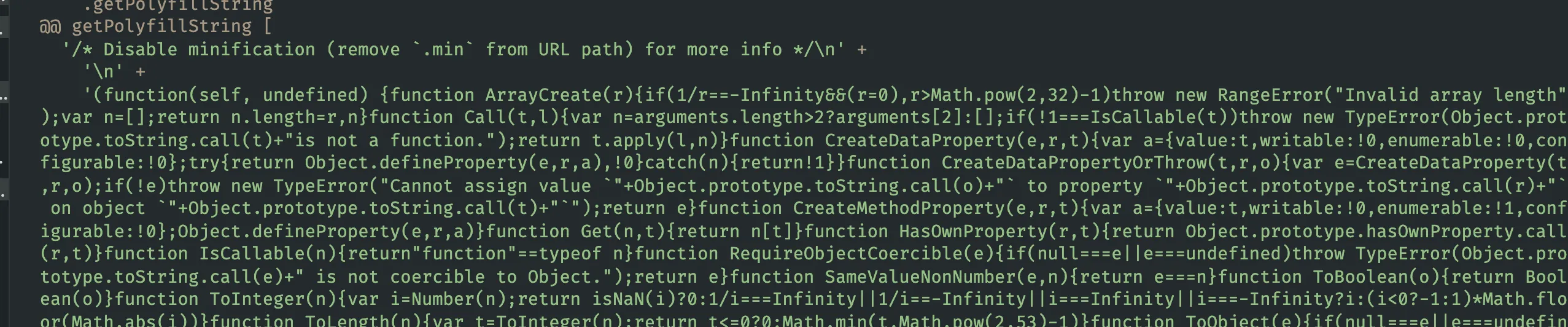
Usage
For the default setup, just drop this script tag into your html file.
<head><script src="https://polyfill.io/v3/polyfill.min.js?features=default"></script></head>polyfill-library, like @babel/polyfill, works by patching the global object.
// https://github.com/Financial-Times/polyfill-library/blob/master/polyfills/Array/isArray/polyfill.jsCreateMethodProperty(Array, 'isArray', function isArray(arg) {  return IsArray(arg);});
// https://github.com/Financial-Times/polyfill-library/blob/master/polyfills/_ESAbstract/CreateMethodProperty/polyfill.jsfunction CreateMethodProperty(O, P, V) { // eslint-disable-line no-unused-varsvar newDesc = {  value: V,  writable: true,  enumerable: false,  configurable: true  };
Object.defineProperty(O, P, newDesc);}
Options
https://polyfill.io/v3/polyfill.min.js?features=defaultUse the default value like this and it automatically pulls in whatever polyfills are listed in its internal aliases.json.
I couldn’t find any docs spelling out exactly what’s in the default set, so I dug through the polyfills/_dist/aliases.json file that
npm run test-polyfillsgenerates in polyfill-library instead.
"default":["Array.from","Array.isArray","Array.of","Array.prototype.every","Array.prototype.fill","Array.prototype.filter","Array.prototype.forEach",....]Want only specific features? Pass them via the feature parameter. Want to exclude something? Use excludes.
https://cdn.polyfill.io/v3/polyfill.min.js?features=fetch,IntersectionObserver&excludes=DocumentIf you want a polyfill to load every time, regardless of User Agent, turn on the flags=always option. Pair it with flags=always, gated and it’ll still check whether the browser actually implements the feature before loading anything.
https://cdn.polyfill.io/v2/polyfill.min.js?features=fetch,IntersectionObserver&flags=always,gatedEvery option is documented in the API Reference, and the url-builder tool, which generates the query parameters for you, makes all of this a lot less tedious.
Security
Specifying options through query parameters naturally raises XSS attack concerns. polyfill.io guards against this by escaping option values: the script characters < become < and > become >, so even a script tag slipped into the code never gets interpreted as HTML.
This writeup covers it in more detail.
polyfill-service added this protection in this commit, and it’s been in place since version 3.1.2.
Setting Up Your Own polyfill.io Server
There’s no guarantee the polyfill.io server stays up forever, so depending on it directly in production can feel risky. Running polyfill-library as a self-hosted server takes that worry off the table.
Docker makes standing up your own polyfill-service pretty painless.
FROM node:12.18.0-alpine
RUN apk add --no-cache --update bashRUN apk add --no-cache --update --virtual build git python make gcc g++
WORKDIR /polyfill
# Specify the correct versionARG POLYFILL_TAG='v4.8.1'ARG NODE_ENV='production'RUN \  git clone https://github.com/Financial-Times/polyfill-service . && \  git checkout ${POLYFILL_TAG} && \  rm -rf .git && \  yarn install && \  sed -i.bak -e 's,^node,exec node,' start_server.sh && \  mv start_server.sh /bin/ && \  chmod a+x /bin/start_server.sh && \  apk del buildENV PORT 8801
EXPOSE ${PORT}
CMD ["/bin/start_server.sh", "server/index.js"]
If You’re a Library Author
Once I’d worked through all these ways of handling polyfills, I found myself wondering what the right approach even is when you’re the one building the library.
In a GitHub Issue debating whether polyfilling is the library’s job or the application’s, webpack maintainer sokra put it this way.
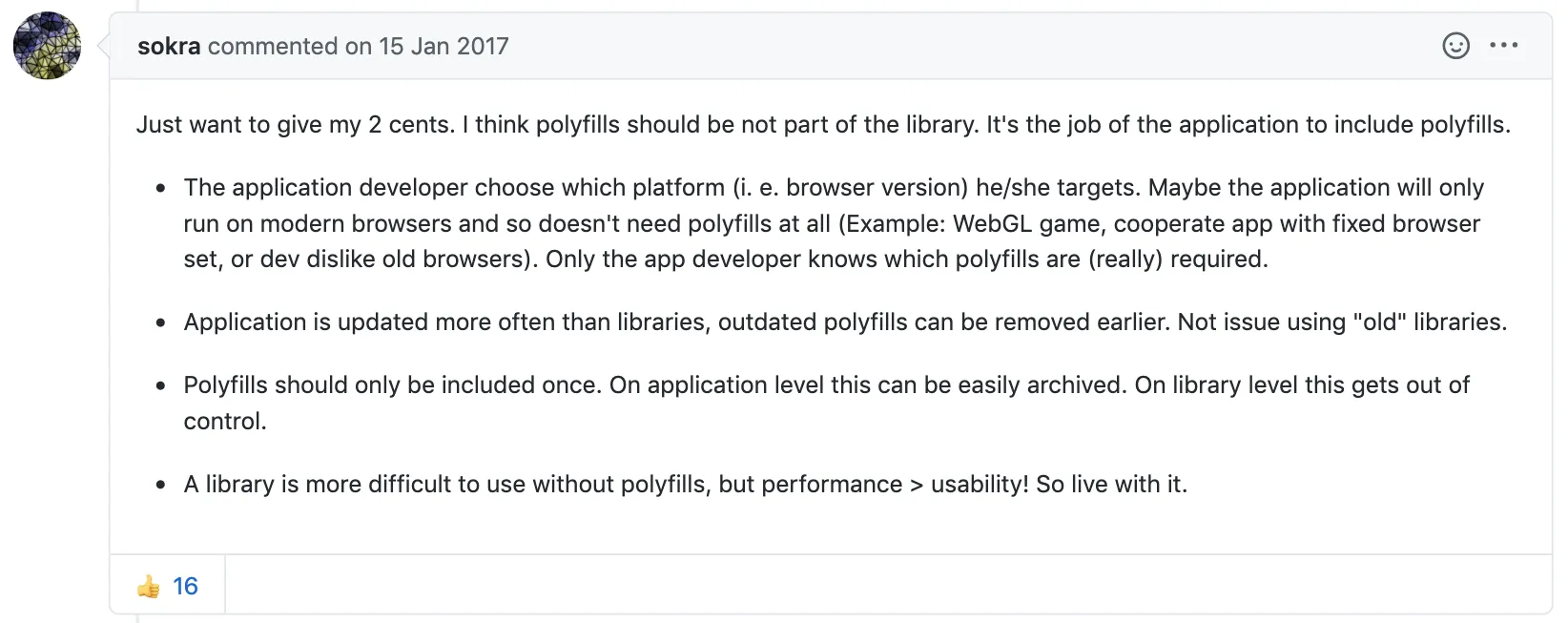
Whether you need a polyfill is easy to control at the application level. At the library level, it isn’t.
That’s why a lot of people came out in favor of pushing polyfill responsibility onto the application, with the library just providing hints about where polyfills are needed.
Wrap-up
babel is still the easiest, most reliable way to add polyfills, but it inflates your bundle size even on modern browsers that never needed the polyfill in the first place.
If bundle size, one of the eternal headaches of building an SPA, is what’s keeping you up, polyfill.io’s User-Agent-based approach, which loads only what a given browser needs, is worth considering too.
Just factor in the extra cost of managing a server, and test thoroughly enough to rule out the inaccurate polyfill issue core-js maintainer “zloirock” has flagged before.
References
- https://programmingsummaries.tistory.com/
- https://github.com/babel/babel/blob/master/packages/babel-polyfill/package.json
- https://github.com/zloirock/core-js
- https://3perf.com/blog/polyfills/
- https://babeljs.io/docs/en/babel-plugin-transform-runtime
- https://github.com/Financial-Times/polyfill-library
- https://slides.com/odyss/deck-8
- https://www.youtube.com/watch?v=8GcVBTBI4Ew&list=PLZl3coZhX98oeg76bUDTagfySnBJin3FE&index=12
- https://snyk.io/vuln/npm:polyfill-service:20160126
- https://github.com/3YOURMIND/js-polyfill-docker
