Setting Up a Monorepo Environment (w. lerna + rollup + typescript)
June 21, 2020
Translated from the Korean original.
Before we start
Here’s how to set up a package environment in a Monorepo using Lerna. Quick pitch for Monorepos first: you get to share configuration that would otherwise be duplicated across projects, and your modularized packages can reference each other directly.
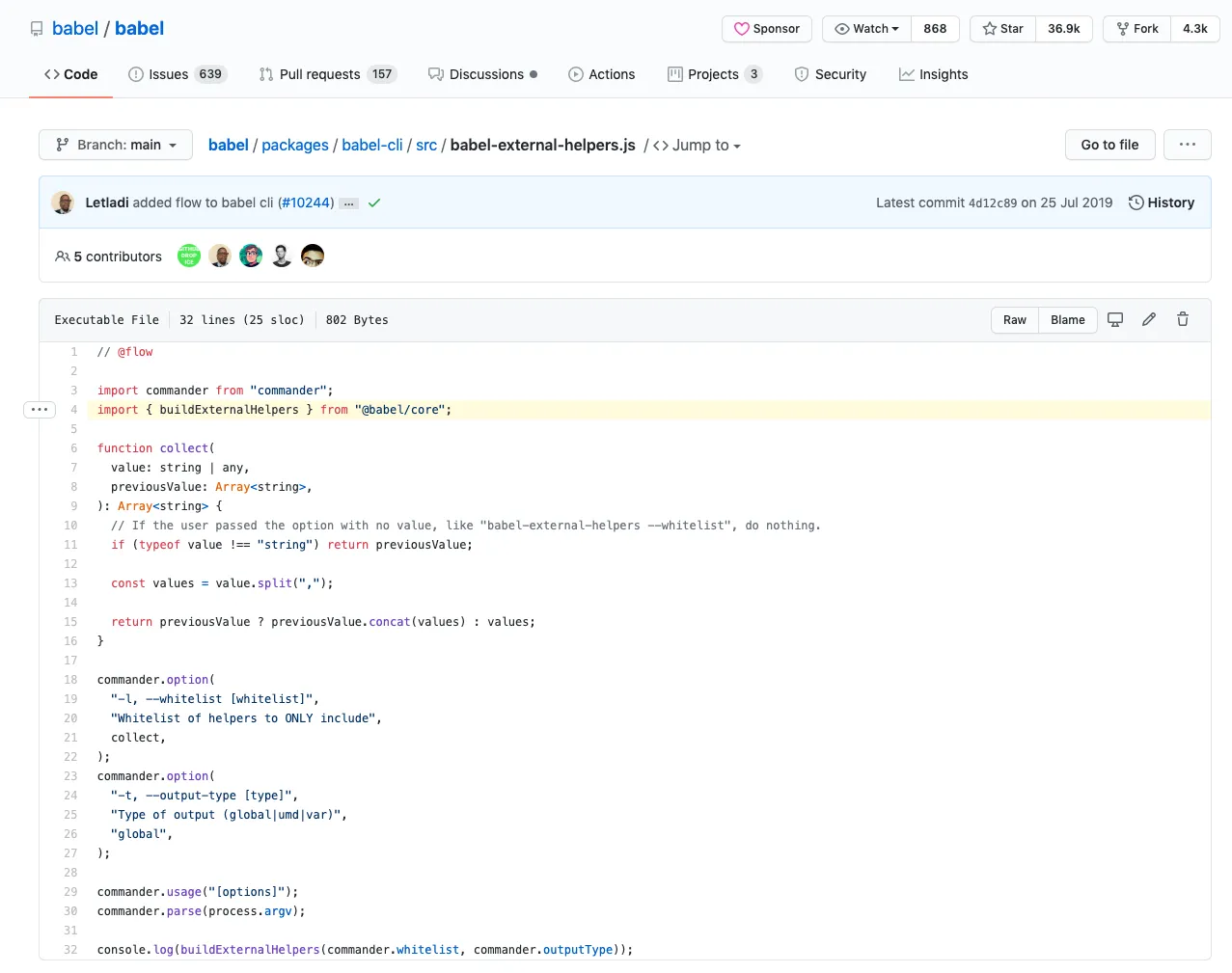
Take babel-external-helpers, one of the packages inside babel — probably the best-known project built as a Monorepo. It references and uses the @babel/core package directly, as shown below.
Lerna makes setting up a Monorepo repository easy. It’s a library built for managing multiple packages in a Monorepo: building the whole project, running tests, and handling every package the repo manages, all at once.
Instead of configuring each package on its own, here’s a step-by-step approach where config files live at the root and every package shares them.
You can find the full code for this post here.
What we want to share
The project in this post uses Rollup as its bundler and TypeScript, and it outputs both CJS and ESM. So every package needs these config files in common:
- rollup.config.js
- tsconfig.json
Rather than creating them in every package, we’ll keep them at the root and share them from there.
Step 0. Add the config files at the root
Start by adding rollup.config.js and tsconfig.json at the project root.
export default [  buildJS(input, pkg.main, 'cjs'),  buildJS(input, 'dist/esm', 'es'),];
function buildJS(input, output, format) {  const defaultOutputConfig = {    format, exports: 'named', sourcemap: true,  };
  const esOutputConfig = {    ...defaultOutputConfig,    dir: output,  };  const cjsOutputConfig = {    ...defaultOutputConfig,    file: output,  };
  const config = {    input,    // omitted - https://github.com/SoYoung210/lerna-rollup-github-package-example/blob/master/rollup.config.js    preserveModules: format === 'es', // so it isn't bundled into a single file (Tree Shaking)  };
return config;}{ "compilerOptions": { "module": "es6", // so only esm-style d.ts files are generated "target": "es6", "lib": ["es6", "dom", "es2016", "es2017"], "sourceMap": true, "moduleResolution": "node", "allowJs": true, "noImplicitAny": true, "strictNullChecks": true, "strict": true, "allowSyntheticDefaultImports": true, "esModuleInterop": true, "declaration": true, "emitDeclarationOnly": true, }, "exclude": [ "*.config.js", // exclude config files from type generation "packages/**/node_modules/*.d.ts", "node_modules/*.d.ts", "**/dist/**/*" ]}Step 1. Add a lerna build script
Add this script to package.json.
// root's package.json"devDependencies": { "rollup": "2.16.1", // ...},"scripts": { "build": "lerna run build"},Running npm run build at the project root runs the build script defined in each package’s own package.json.
Add a build script to packages/sample-one.
"scripts": { "build": "NODE_ENV=production rollup -c ../../rollup.config.js"}This points the package at the root’s rollup.config.js. To support both ESModule and CommonJS, also add main and module fields, plus one for types.
"main": "dist/cjs/index.js","module": "dist/esm/index.js","types": "dist/index.d.ts",Step 2. Reading each package’s own config
The config files are shared, but each package still needs some room to customize things. Maybe it needs different peerDependencies, or a different input file for rollup.
To bridge the root config files with each package, we’ll use an environment variable and read-pkg-up.
Environment variables
Since rollup.config.js’s path and each package’s path don’t match, we pass the input file’s path as an environment variable from the package’s own package.json.
👩🏻💻: You could hardcode the path in rollup.config.js itself, or use something like process.cwd — I just went with this for simplicity. Feel free to do it better.
"scripts": { "build": "NODE_ENV=production rollup -c ../../rollup.config.js" "build": "NODE_ENV=production INPUT_FILE=./index.ts rollup -c ../../rollup.config.js"}Update rollup.config.js to read the input path from that environment variable.
const input = process.env.INPUT_FILE;
function buildJS(input, output, format) {  const defaultOutputConfig = {    format, exports: 'named', sourcemap: true,  };
  const esOutputConfig = {    ...defaultOutputConfig,    dir: output,  };  const cjsOutputConfig = {    ...defaultOutputConfig,    file: output,  };
  const config = {    input,    // ...omitted  }}
read-pkg-up
read-pkg-up reads the nearest package.json up the directory tree.
Running lerna ${command} from the Monorepo root walks every path listed under packages in lerna.json and runs the script there — this library is what makes it easy to read each package’s own package.json along the way.
Here’s an example that reads each package’s package.json and customizes its external setting accordingly.
const fs = require('fs');const readPkgUp = require('read-pkg-up');
const { packageJson: pkg } = readPkgUp.sync({  cwd: fs.realpathSync(process.cwd()),});
const pkgDependencies = Object.keys(pkg.dependencies || {});const pkgPeerDependencies = Object.keys(pkg.peerDependencies || {});const pkgOptionalDependencies = Object.keys(pkg.optionalDependencies || {});
const config = {  input,  external: pkgDependencies        .concat(pkgPeerDependencies)        .concat(pkgOptionalDependencies),  plugins: [    /* omitted */  ]}
Step 3. Generating type declarations
The rollup.config.js from Step 0 already supports both the CommonJS and ES Module formats.
Build the project with lerna build, and you’ll get something like this:
packages/sample-one+-- dist| +-- esm| +-- index.js| +-- index.js.map| +-- main.js.map| +-- cjs| +-- index.js+-- +-- index.js.mapesm and cjs each get their own folder. A type definition file supporting ES Modules still needs to land under dist/.
Without index.d.ts under dist/, importing the module throws a can’t-find-it error, like this:

You could reach for rollup-plugin-typescript2, but it has a bug where the d.ts ends up under the esm folder instead of dist/. So instead of building types through rollup, we run that step separately.
There’s a catch with tsconfig.json, though: not every package can share the same type-definition settings.
"scripts": { "build": "npm run build:typings && NODE_ENV=production INPUT_FILE=./index.ts rollup -c ../../rollup.config.js", "build:typings": "tsc -p ../../tsconfig.json --declarationDir dist"}Point every package at the root’s tsconfig.json like this, and the type build runs across every package under packages, not just the one you’re building:
packages/sample-one+-- dist| +-- esm| +-- index.js| +-- index.js.map| +-- main.js.map| +-- cjs| +-- index.js+-- +-- index.js.map| +-- sample-one| +-- index.d.ts| +-- main.d.ts| +-- sample-two| +-- index.d.ts+-- +-- main.d.tsGive each package its own tsconfig.json so it carries information about its own path.
{  "extends": "../../tsconfig.json"}
// packages/sample-two/tsconfig.json{  "extends": "../../tsconfig.json"}
Update the tsconfig.json path used in build:typings to match.
"scripts": { "build:typings": "tsc -p ../../tsconfig.json --declarationDir dist" "build:typings": "tsc -p ./tsconfig.json --declarationDir dist"}Setting up absolute paths inside a package
To reference things by absolute path inside a package, like import { main } from '@sample-one/main', add path settings to tsconfig.json. (reference)
{ "compilerOptions": { "baseUrl": "./packages", "paths": { "@sample-one/*": ["sample-one/*"], "@sample-two/*": ["sample-two/*"], }, "plugins": [ { "transform": "typescript-transform-paths" }, { "transform": "typescript-transform-paths", "afterDeclarations": true } ] }}🚨: Skip adding even one package under
packagestopaths, and the type build throws.
Fixing package build:typings
Modules referenced by absolute path don’t get their d.ts generated correctly out of the box, so we bring in ttypescript and typescript-transform-paths to fix that.
npm i -D ttypescript typescript-transform-pathsUpdate the build:typings script we wrote earlier.
If your project doesn’t use absolute paths, plain tsc is all you need.
"scripts": { "build:typings": "tsc -p ./tsconfig.json --declarationDir dist", "build:typings": "ttsc -p ./tsconfig.json --declarationDir dist"},Step 4. Setting up GitHub Package deployment
Now let’s wire this project up to deploy through the GitHub Package Registry.
Before touching any GitHub settings, check the single most important field in a Monorepo’s package.json: name.
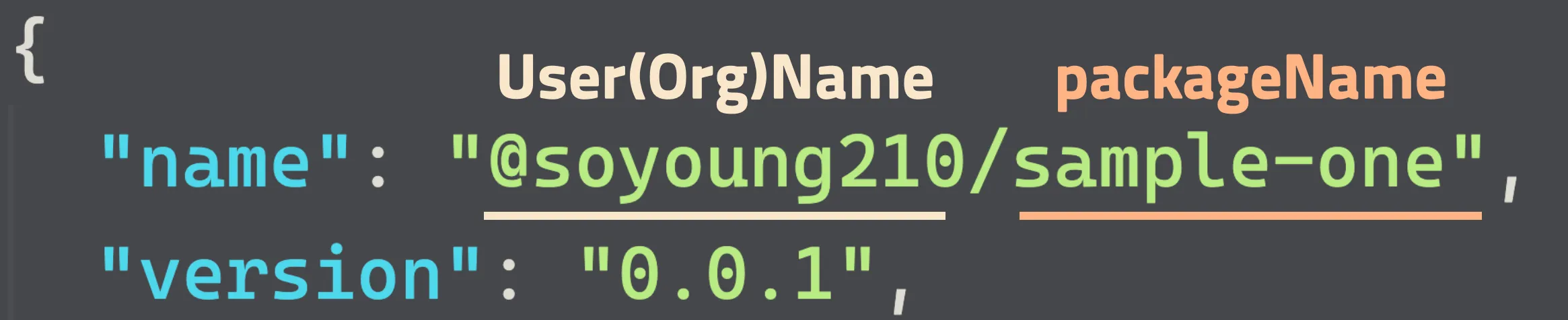
Skip the @${userName}/${packageName} format shown above, and you’ll hit an error like this:
lerna ERR! E400 scope 'test' in package name '@test/sample-two' does not match repo owner 'SoYoung210' in repository element in package.jsonCreating .npmrc
Create an .npmrc file at the project root with the following.
@userName:registry=https://npm.pkg.github.com/userNameThis tells npm that any package prefixed with @userName in package.json, like @userName/sample-one, gets downloaded from the GitHub Package Registry (https://npm.pkg.github.com/userName) instead of the official npm registry (https://registry/npmjs.org/).
Issuing a token
To deploy to the GitHub Package Registry from a GitHub Action, you need a token with package permissions. Follow the guide and issue one with write:packages and read:packages permissions.
Once you leave the token-creation page, you can’t see the value again, so save it somewhere safe.
Action
GitHub Actions can deploy to the GitHub Package Registry automatically on every merge to master.
First, add the token from earlier as a Secret on the repo.
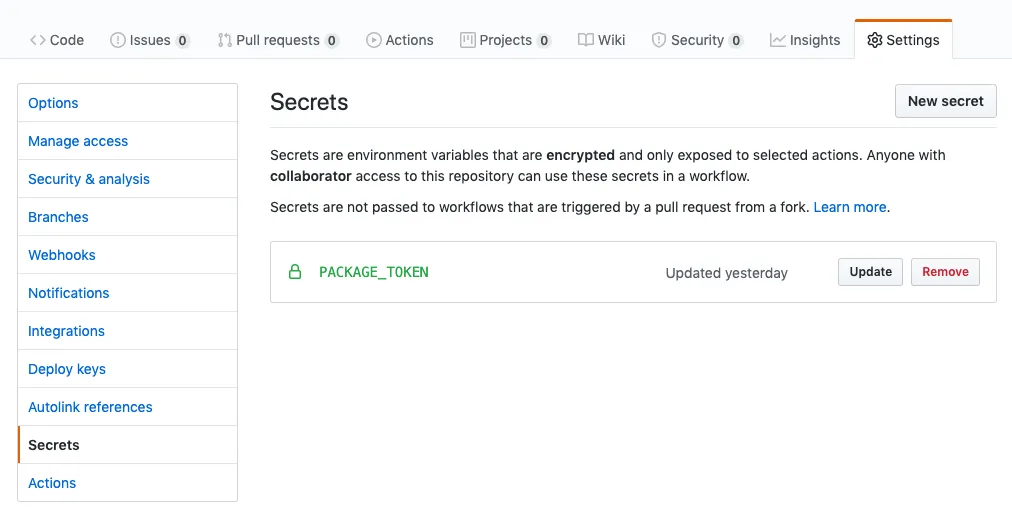
Then create a release.yml file under .github/workflows.
name: Release
on:  push:    branches:      - master
jobs:  deploy:    runs-on: ubuntu-18.04    steps:    - name: checkout      uses: actions/checkout@v2      with:        # pulls all commits (needed for lerna to correctly version)        # see https://stackoverflow.com/a/60184319/9285308 & https://github.com/actions/checkout        fetch-depth: "0"    - name: Add GiHub Package Token      run : echo "//npm.pkg.github.com/:_authToken=${{ secrets.PACKAGE_TOKEN }}" > ~/.npmrc    - name: Setup Node.js      uses: actions/setup-node@v1      with:        node-version: 12.18.0    - name: Install Dependencies      run: npm install    - name: Deploy new Package      run: npm run publish      env:        GH_TOKEN: ${{ secrets.GITHUB_TOKEN }}        GITHUB_TOKEN: ${{ secrets.GITHUB_TOKEN }}        NODE_AUTH_TOKEN: ${{ secrets.GITHUB_TOKEN }}
Every merge into master triggers the Release Action, which writes the PACKAGE_TOKEN you added earlier into .npmrc. That token is what lets the Action publish a new GitHub Package.
npm run publish runs lerna publish under the hood, which only deploys the packages whose version actually changed.
Wrapping Up
That’s the gist of setting up a Monorepo environment. This was the first time I’d managed multiple packages in a Monorepo on a real project, and I felt the benefits firsthand: shared config consolidated in one place, dependency modules that are actually easy to manage, and more.
Ref
Giving Lerna Monorepos a Try (Korean)
https://github.com/tdeekens/flopflip
https://github.com/azu/lerna-monorepo-github-actions-release
https://kishu.github.io/2017/05/23/setting-up-multi-platform-npm-packages/
https://medium.com/@joshuaavalon/webpack-alias-in-typescript-declarations-81d2b6c0dcd6
