node modules splitting
2020년 8월 30일
web application을 만들 때 여러 기능을 빠르고 쉽게 지원하기 위해 여러 library를 사용합니다. 이 library를 어떻게 build하는지에 따라 초기 페이지 로딩 속도가 크게 좌우될 수 있습니다.
이 글에서는 webpack의 splitChunk 옵션을 수정하여 node module을 여러 개의 bundle file로 나눌 수 있는 방법에 대해 소개합니다.
사용되는 모든 코드는 이 저장소에서 확인하실 수 있습니다.
cacheGroups
주요하게 수정할 부분은 webpack splitChunks의 cacheGroups옵션입니다.
cacheGroups는 특정 조건에 따라서 청크파일을 생성한다는 규칙 정의입니다. cacheGroups object의 key값이 각 ‘규칙의 이름’이 됩니다. 이 글에서 설명할 cacheGroups 규칙은 Next.js의 webpack-config.ts 를 일부 수정한 내용입니다.
framework, lib, commons 3가지 규칙
cacheGroups의 default 설정은 모두 false로 ‘사용하지 않음’으로 명시해 주고, 커스텀 한 규칙 3가지를 정의합니다.
cacheGroups: { default: false, vendors: false, framework: {}, lib: {}, commons: {}}여기서 이름이 꼭 위 예시와 같을 필요는 없습니다. webpack splitChunk 문서에서는
splitChunks.cacheGroups.{cacheGroup}.priority형태로 안내하고 있습니다.
- framework: react, react-router-dom 등 프로젝트가 사용하는 core framework를 분리한 chunk
- lib: 기준 크기를 넘어가는 노드 모듈에 대한 별도 chunk
- commons: 그 외의 모듈 chunk
위 규칙을 담은 config는 다음과 같습니다.
cacheGroups: {  default: false,  vendors: false,  framework: {    chunks: 'all',    name: 'framework',    test: /(?<!node_modules.*)[\\/]node_modules[\\/](react|react-dom|react-router-dom)[\\/]/,    priority: 40,    enforce: true,  },  lib: {    test(module) {      return (        module.size() > 80000 &&        /node_modules[/\\]/.test(module.identifier())      );    },    name(module) {      const hash = crypto.createHash('sha1');
      hash.update(module.libIdent({ context: __dirname }));
      return hash.digest('hex').substring(0, 8);    },    priority: 30,    minChunks: 1,    reuseExistingChunk: true,  },  commons: {    name: 'commons',    minChunks: 1, // entry points length    priority: 20,  }}
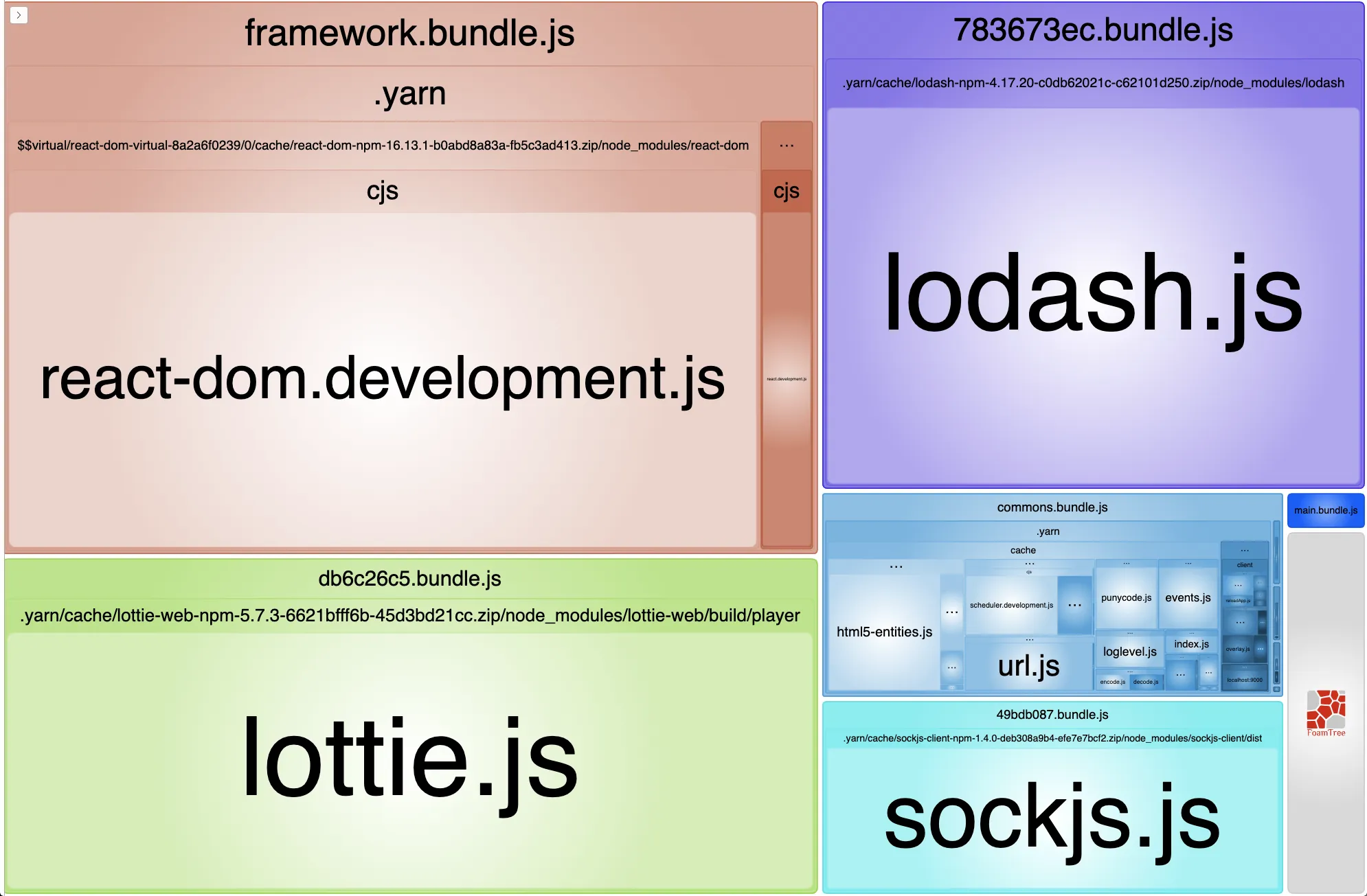
이 규칙에 따라 나눠진 bundle입니다. framework, commons 그리고 lib에서 정의한 [hash] 이름으로 분리되었습니다.
이제, 각 규칙을 이루고 있는 속성들에 대해 알아보겠습니다.
Priority
각 노드 모듈을 cacheGroups의 test 규칙에 따라 여러 cacheGroup에 속할 수 있습니다.
모듈이 두 가지 이상의 그룹에 속할 수 있을 때, 이 priority를 보고 높은 규칙에 속하게 됩니다.
chunks: all
chunks 설정에 줄 수 있는 옵션은 세 가지입니다.
initial, async, all
import React from 'react'import('lodash') // dynamic load
console.log('hello a')
export default a;a.js에서 lodash는 dynamic import 되었고, react는 즉시 import되었습니다.
splitChunks: { cacheGroups: { defaultVendors: { test: /[\\/]node_modules[\\/]/, chunks: 'async' }, }}위 설정은 defaultVendors라는 chunk 그룹을 생성하고 이 그룹에는 node_modules 폴더 아래에 있는 파일 중 비동기로 import된 파일들을 포함 시키는 설정입니다.
만약 chunks 옵션이 all인 경우 import 방식에 상관 없이 node_modules 아래에 있는 파일은 모두 defaultVendors.js로 모듈이 나눠지게 됩니다.
웹팩 node_modules splitting의 전제 자체가 browser에서 리소스를 병렬적으로 로드할 수 있으니, 번들을 작게 쪼개서 전체 로딩 타임을 감소시킨다는 컨셉입니다.
enforce: true?
webpack splitChunks의 다른 설정(minSize, minChunks, maxAsyncRequests등)을 무시하고 이 그룹에 대한 청크를 항상 생성하도록 명시하는 것입니다.
default, vendors, defaultVendors: false?
cacheGroups: { default: false, vendors: false, // vendors was renamed to defaultVendors defaultVendors: false,}위 속성들을 false로 지정한다는건 무슨 뜻일까요?
webpack은 기본적인 splitChunk 옵션들을 제공합니다.
SplitChunk 옵션 문서에는 아래와 같은 기본 값 설정이 명시되어 있습니다.
module.exports = { //... optimization: { splitChunks: { chunks: 'async', minSize: 20000, minRemainingSize: 0, maxSize: 0, minChunks: 1, maxAsyncRequests: 30, maxInitialRequests: 30, automaticNameDelimiter: '~', enforceSizeThreshold: 50000, cacheGroups: { defaultVendors: { test: /[\\/]node_modules[\\/]/, priority: -10 }, default: { minChunks: 2, priority: -20, reuseExistingChunk: true } } } }};위 옵션을 모두 false로 처리할 경우, 기본 SplitChunk 설정을 모두 사용하지 않고 custom rule만 적용한다는 뜻입니다.
test와 name의 parameter가 되는 modules
lib 설정 쪽에서 기준 크기를 작게 잡으면, css 관련 모듈도 lib 규칙에 포함될 수 있는데, 이때 CSS 모듈관련 오류가 발생할 수 있습니다.
TypeError: module.libIdent is not a function at Object.name [as getName] (/webpack.config.js:169:34) at addModuleToChunksInfoMap (/webpack/lib/optimize/SplitChunksPlugin.js:497:31) at /webpack/lib/optimize/SplitChunksPlugin.js:630:9 at SyncBailHook.eval [as call] (eval at create (/node_modules/tapable/lib/HookCodeFactory.js:19:10), <anonymous>:5:16) at SyncBailHook.lazyCompileHook (/node_modules/tapable/lib/Hook.js:154:20)다시 아까 적었던 설정을 살펴봅시다.
 lib: {   test(module) {     return (       module.size() > 80000 &&         /node_modules[/\\]/.test(module.identifier())      );    },   name(module) {     const hash = crypto.createHash('sha1');     if (!module.libIdent) {       throw new Error(         `Encountered unknown module type: ${module.type}. Please open an issue.`,        );      }
     hash.update(module.libIdent({ context: __dirname }));
     return hash.digest('hex').substring(0, 8);   }},
css 모듈의 크기가 test 조건에 부합하였고, name 부분에서 이름을 정하는 규칙에서 에러가 throw 되었습니다.
mini-css-extract plugin에 의해 생성된 CSS 모듈에는 libIdent가 없습니다. module type이 mini-css-extract에 의해 분리된 모듈인지 확인하는 조건문이 필요합니다.
const isModuleCSS = (module) => {  return module.type === 'css/mini-extract';};
lib: {  test(module) {    return (      module.size() > 80000 &&      /node_modules[/\\]/.test(module.identifier())    );  },  name(module) {    const hash = crypto.createHash('sha1');
    if (isModuleCSS(module)) {      module.updateHash(hash);
      return hash.digest('hex').substring(0, 8);    } else {      if (!module.libIdent) {        throw new Error(          `Encountered unknown module type: ${module.type}. Please open an issue.`,        );      }    }    hash.update(module.libIdent({ context: __dirname }));
    return hash.digest('hex').substring(0, 8);  },  priority: 30,  minChunks: 1,  reuseExistingChunk: true,}
사용하고 있는 module 객체 정보에 대한 정보는 간략히 다음과 같이 정리할 수 있습니다.
- libIdent: 모듈의 위치 정보입니다. module.libIndent()를 호출하면 다음과 같은 결과를 확인할 수 있습니다.
- ex: /${projectPath}/node_modules/${moduleName}/${fileName}js
- type: 모듈의 타입. 대부분의 노드 모듈은
javascript/auto타입이고, css module의 경우css/mini-extract입니다. - size: 모듈의 사이즈
마무리
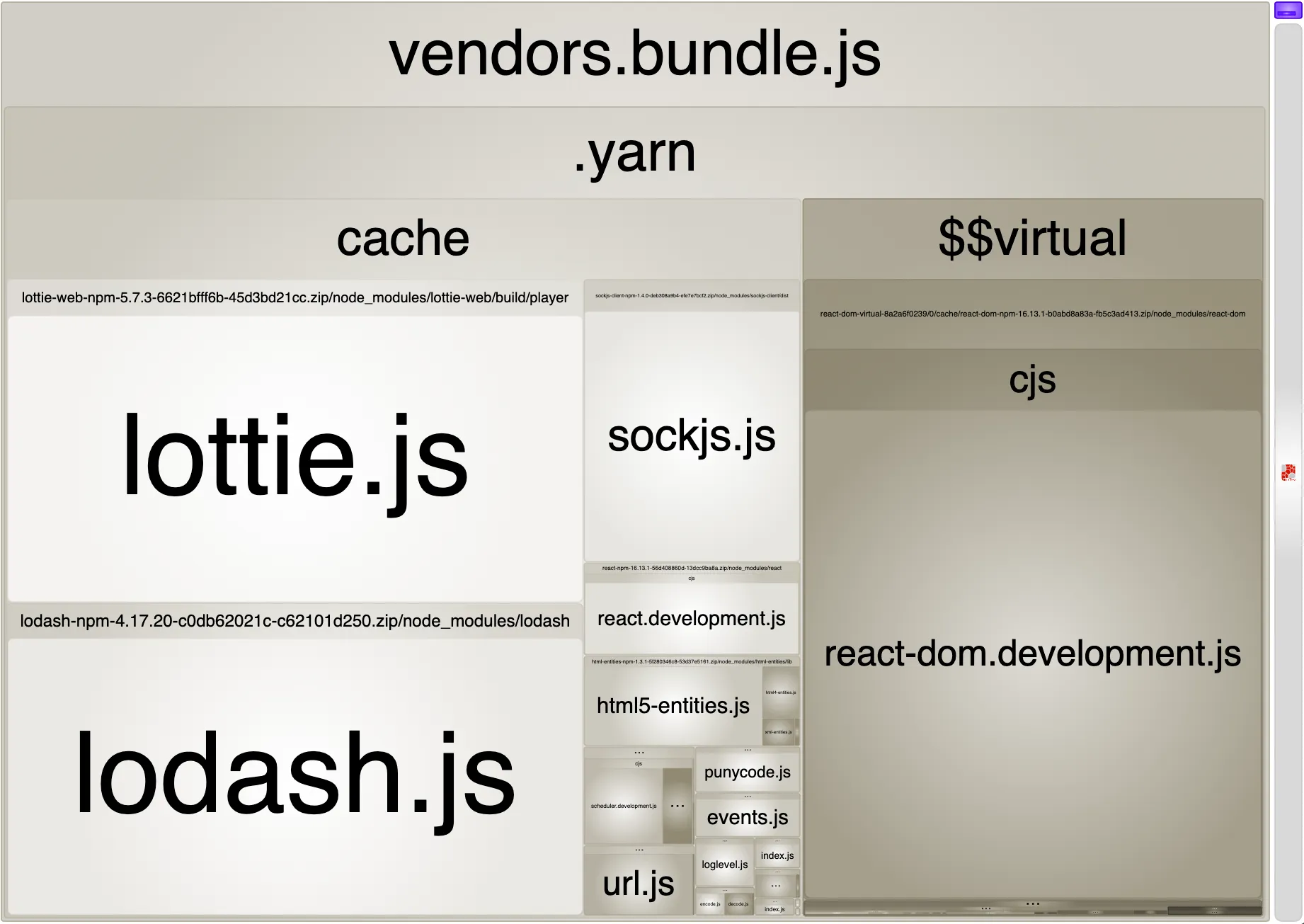
cacheGroups을 적용하기 전/후의 bundle analyzer 결과입니다.
Before
After
lottie, lodash 등 비교적 큰 모듈을 각각 chunk로 나누고, 이를 병렬적으로 load 하는 방식으로 첫 페이지 로딩 속도를 개선시킬 수 있습니다.
Reference
